

When people come across a number like 212.32.266.234, they often wonder whether it is a website address, a server location, or a suspicious network identifier. Internet addresses can look confusing because they contain groups of numbers separated by dots, and even a small mistake can change whether an address is usable or not.
To understand this type of entry, it is important to know how IP addresses work, what makes them valid, and why certain number combinations cannot exist on the internet. In this guide, we will explore the meaning behind this address format, common mistakes, security considerations, and practical ways to analyze similar network details.
What Is an IP Address?
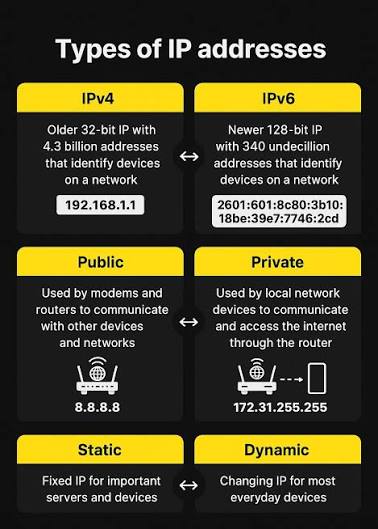
An IP address (Internet Protocol address) is a unique numerical label assigned to a device connected to a network. It allows computers, servers, smartphones, and other internet-enabled devices to communicate with each other.
Most traditional IP addresses use the IPv4 format. An IPv4 address consists of four sections called octets. These sections are separated by periods, and each octet contains a number between 0 and 255.
For example:
- 192.168.1.1 is a valid IPv4 address
- 8.8.8.8 is a valid IPv4 address
- 212.32.266.234 is not a valid IPv4 address
The reason the last example fails is because one section exceeds the allowed range.
Why 212.32.266.234 Is Not a Valid IPv4 Address
The address 212.32.266.234 contains four numerical parts:
| Section | Value | Valid Range | Status |
|---|---|---|---|
| First octet | 212 | 0–255 | Valid |
| Second octet | 32 | 0–255 | Valid |
| Third octet | 266 | 0–255 | Invalid |
| Fourth octet | 234 | 0–255 | Valid |
The problem is the number 266. Since an IPv4 octet cannot be higher than 255, this address cannot be assigned to a real device as a standard IPv4 address.
This does not mean the entire format is meaningless. It may simply be a typing mistake, a copied value with an error, a placeholder, or a malformed entry generated by software.
Common Reasons People Encounter Incorrect IP Addresses
Incorrect IP formats appear more often than many people expect. There are several possible reasons someone might see an address like this.
Typing Errors
One of the most common causes is a simple human mistake. Someone may intend to enter a valid address but accidentally add an extra digit.
For example, an address containing “266” might have originally been something like:
- 226
- 216
- 206
A single incorrect character can make an IP address unusable.
Configuration Problems
Network administrators often work with large lists of servers, devices, and security rules. A manually entered error in a configuration file can create an invalid address.
A firewall rule, monitoring tool, or access-control system may display incorrect information if the original data contains mistakes.
Data Collection Issues
Online databases and automated tools collect huge amounts of network information. Sometimes inaccurate formatting can appear due to software bugs, incomplete validation, or incorrect data processing.
Practical Example of Invalid IP Address Detection
Imagine a company administrator reviewing server logs after noticing unusual traffic. During the investigation, they find an entry showing 212.32.266.234 as the source address.
At first, it may look like a suspicious connection attempt. However, after checking the address format, the administrator realizes that the value cannot exist as a normal IPv4 address because the third section is outside the allowed range.
Instead of blocking a nonexistent address, they investigate the logging system and discover that a data formatting issue created the incorrect entry.
This example shows why understanding IP structure is useful before making security decisions.
How to Check Whether an IP Address Is Real
If you encounter an unfamiliar network address, there are several ways to verify it.
Check the Format Manually
The quickest method is reviewing each section:
- Confirm there are four parts.
- Ensure each part contains only numbers.
- Verify every number is between 0 and 255.
If any section breaks these rules, the address is invalid.
Use Network Tools
Online IP lookup services and command-line tools can help analyze valid addresses. However, these tools usually cannot provide meaningful information for incorrectly formatted IPs.
Common checks include:
- Location information
- Internet service provider details
- Domain associations
- Reputation reports
These features only work when the address follows proper IP standards.
Valid IP Addresses vs Invalid Entries
Understanding the difference between a working address and an incorrect one can prevent confusion.
| Feature | Valid IPv4 Address | Invalid IP Entry |
| Number of sections | Four octets | May have incorrect values |
| Range of numbers | 0–255 per section | Contains values outside the range |
| Can identify a device | Yes | No |
| Works with network tools | Usually yes | Usually no |
| Common cause | Proper assignment | Typing or data errors |
Security Concerns Related to Strange IP Addresses
Seeing an unusual IP format does not automatically mean there is a cyberattack. Many people assume unfamiliar numbers are dangerous, but incorrect formatting is often caused by simple mistakes.
However, unusual network information should still be reviewed carefully, especially when it appears in:
- Server logs
- Security alerts
- Email headers
- Application records
The key is verification. A properly formatted IP address can be investigated, while an invalid one usually points toward a data-quality issue.
My Experience Checking Network Data
I once reviewed a technical report where several IP entries looked suspicious at first glance. After checking the formatting carefully, I found that some were not actual network addresses but incorrectly copied values. That small validation step prevented unnecessary troubleshooting and saved time.
The Importance of Accurate IP Information
Reliable IP data helps businesses maintain secure networks, track performance, and troubleshoot technical problems. Whether managing a website, monitoring visitors, or configuring a server, accurate information is essential.
An incorrect value like 212.32.266.234 highlights why automated validation and careful data handling matter. A single incorrect number can make an otherwise useful record impossible to process.
Also Read: Where Can I Buy 1.5f8-p1uzt? Complete Buying Guide
Conclusion
The address 212.32.266.234 looks like a standard IPv4 address at first, but it is not valid because the third section contains the number 266, which exceeds the maximum allowed value of 255.
Understanding how IP addresses work helps users identify mistakes, avoid confusion, and handle network information more effectively. Whether the issue comes from manual entry, software errors, or incorrect records, checking the structure of an address is always the first step.
By learning the basics of IP formatting, anyone can better understand internet connectivity and recognize when a network detail requires further investigation.
FAQs
Is
212.32.266.234
a real IP address?
No. It is not a valid IPv4 address because the third octet, 266, is outside the permitted range of 0 to 255.
Can an IP address contain numbers above 255?
No. In IPv4 addressing, each section must contain a number between 0 and 255.
Why would someone see an invalid IP address?
Invalid addresses usually appear because of typing mistakes, incorrect data collection, software errors, or configuration problems.
Can an invalid IP address track someone’s location?
No. Since 212.32.266.234 is not a valid IPv4 address, it cannot be used for normal geolocation or device identification.
What should I do if I find an incorrect IP in my logs?
Check the source of the data, verify the logging system, and look for formatting problems before taking security actions.




Leave a Comment